I want to set up Saturday and Sunday as weekly off for Sales department, whereas Facility and administrative department has only one day off (i.e. Sunday). Can I set it up in Empxtrack?
Empxtrack allows you to configure different weekend days for different departments. Follow the steps:
-
Login as HR admin and go to Product Configurations.
-
Under Self and Manager services, click Setup weekends and holiday calendar.
-
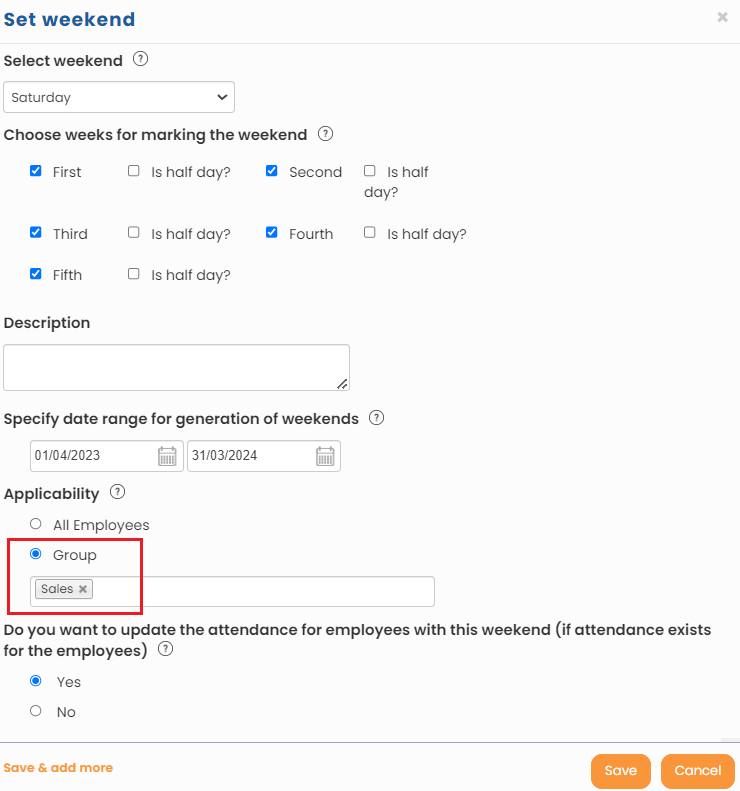
Click Define weekends and select the weekend day from the dropdown.
-
Choose all the weeks for marking the weekend and specify date range for generation of weekends.
-
In the Applicability section, select Group and specify the name of the group.
-
Select Yes if you want to update the attendance for employees this weekend.
-
Save the weekend. Otherwise, click Save and add more to add more weekend days.
Note: Empxtrack free plan supports a single company-wide holiday calendar + weekend policy. Upgrade the plan to avail this functionality.