I am not able to change my date of birth (DOB). Can you assist?
-
An HR manager can modify their own or employees’ personal details (such as date of birth). Follow the steps:
-
On the homepage dashboards, go to View employees widget and click profile picture.
Click View full profile. -
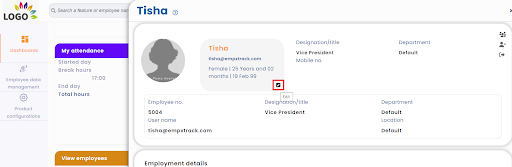
Go to the basic details section and click on the Edit icon.
-
On the ‘Employee basic details >> Modify’, change the date of birth by using calendar control.
-
Submit the change. The DOB will be updated successfully.
P.S. Employees would be able to edit their basic details, once Employee Portal & HRIS is purchased. The changes will go through an approval workflow before final update in the system.