How to modify or delete roles/permissions assigned to an employee? Is there any option to define a new set of roles/permissions and assign it to an employee?
Yes, Empxtrack allows you to define new roles and modify or delete the existing ones from the system. The access permissions and visibility rules can be set as per the requirements.
To define a new role, and giving the access permissions and visibility rules, follow the steps:
-
Go to Product configurations >> General settings >> Setup employee groups
-
Click Add new role.
-
Specify a unique role name.
-
Select role.
-
Apply search criteria by selecting the suitable options for all the fields.
-
Add and exclude employees in the fields. The employees included or excluded in the field will be shown or not shown accordingly.
-
Specify employee names to Assign group to one or more employees and give access rights. You can select an option to give Full access or Read only access.
-
Provide access for specific modules to the employees assigned the groups in the Assign module visibility.
-
Click Confirm.
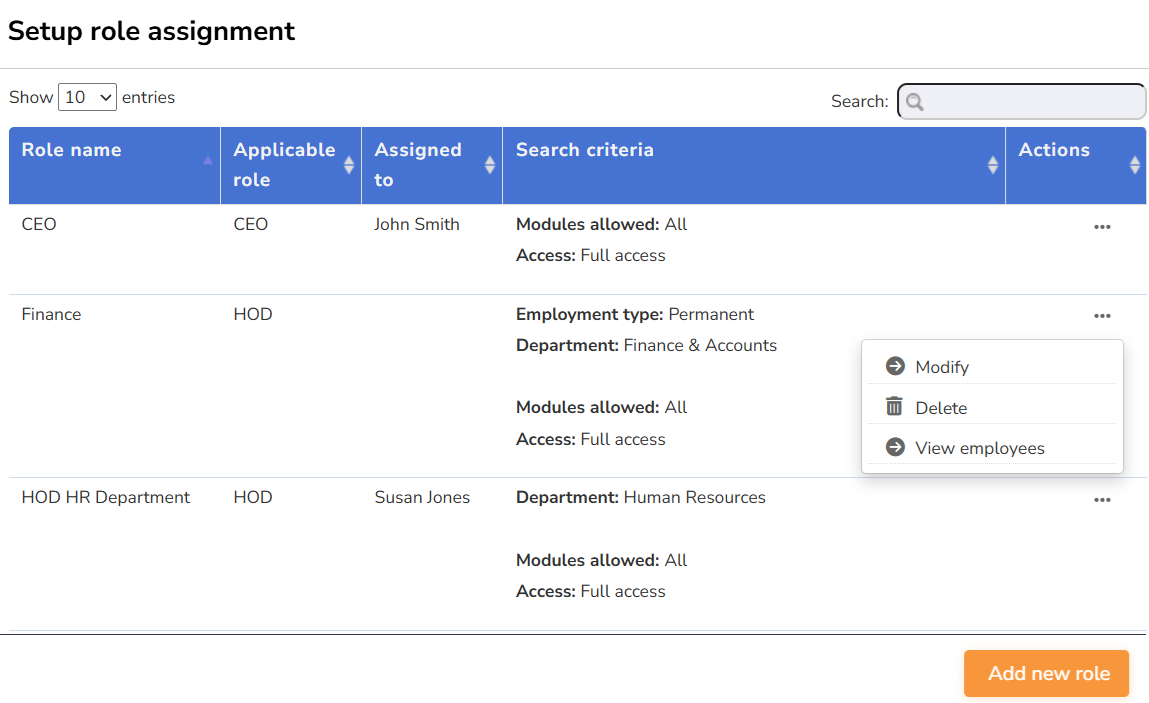
To modify or delete an existing role, follow these steps.
-
Go to Product configurations >> General settings >>Setup role assignment.
-
Under Actions, click on Delete or Modify as per your requirement.
If you need to create a new employee group, refer to: how to define a new group.
Note: Upgrade your plan to avail this functionality.